AP automation for Xero groups
Accounts payable for groups running more than one Xero.
APBuddy reads each invoice, codes it the way you coded that supplier last time, gets it approved by the right people and posts a draft bill into the right entity’s Xero. Every entity in one queue, with the controls your auditor asks about built in.
The demo opens a fully populated group of companies in Australia and New Zealand. No card, no Xero connection, nothing to install.
- Received
- Read
- Coded
- Approved
- Posted
The problem
Xero is built for one company. Your group isn’t one company.
Xero is right to keep each organisation’s ledger sealed. It leaves accounts payable for a group with nowhere to live.
01
One Xero at a time
Each entity is its own Xero organisation, so the AP team switches files all day and nobody can see what the group owes in one place.
02
Typed in from the PDF
Every bill is keyed by hand, then coded from memory or a spreadsheet of which account and project each supplier goes to.
03
Approved somewhere else
Sign-off happens in an email thread nowhere near the bill. When the auditor asks who approved it, and under which limit, someone goes digging.
04
Bank details changed by email
A supplier “updates their account” in an email, someone edits the contact, and the next payment goes to a stranger. Nobody checked; nothing recorded it.
How it works
Five stops between the supplier’s PDF and a draft bill in Xero.
APBuddy does the reading, coding and chasing. People do the approving. Nothing reaches Xero until a bill has every approval it needs.
01 · Received
Each entity gets its own invoice address.
- Suppliers email bills to an address per entity, like invoices-saltbush-constructions@apbuddy.io. Or drag PDFs and phone photos in.
- A sender whose domain matches none of that vendor’s known contacts is flagged before anyone opens the bill.
02 · Read
Read, not rekeyed.
- Supplier, ABN, invoice number, dates, currency, tax and every line item, from PDFs and photos.
- A confidence score on each invoice. The lines are added up and checked against the total, so a misread figure shows up as a sum that doesn’t work.
03 · Coded
Coded the way you coded it last time.
- Matched to the supplier’s Xero contact, with the account and tracking that supplier normally takes.
- Correct a bill and the mapping rule learns. A supplier you’ve never paid waits in Pending Vendors, and its bills can’t post until someone approves it.
04 · Approved
The right approvers, decided by the amount and the cost centre.
- Set bands per entity: under $2,000 needs one approver, over $10,000 needs two. Cost-centre owners get the bills coded to their projects.
- Approvers can approve or reject straight from the email, without logging in. The person who uploaded a bill can’t approve it.
05 · Posted
A draft bill in the right entity’s Xero.
- Contact, reference, line items, accounts, tax, tracking and due date, with the supplier’s PDF attached.
- It lands as a draft, so your payment run in Xero doesn’t change. The processing log keeps every step, from the email arriving to the bill posting.
Built for groups
Five Xero organisations. One accounts payable team.
APBuddy connects every entity in the group and keeps their books separate, so one team can run AP for all of them without logging in and out of Xero.
Need the consolidated numbers too?APBuddy Reporting consolidates the same Xero entities
One queue, every entity
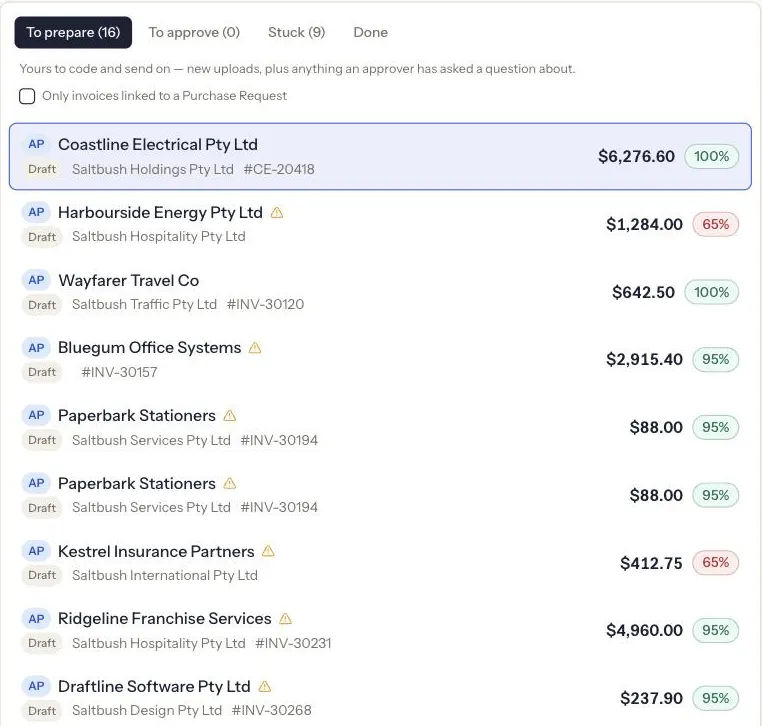
Each bill is tagged with the entity it books to. Work the whole group at once, or filter to one company.
Roles per entity
Someone can approve for Constructions and only read Facilities. Access follows the entity, not a single global role.
Each Xero stays itself
Contacts, accounts, tax rates and tracking come from each organisation’s own Xero. Duplicates are checked within the entity, including bills already in Xero.
Currencies and countries
Bills post in the currency on the invoice. Built in Australia, and running entities in New Zealand, the UK and the UAE.
Shared costs, split properly
Recharge a group cost across entities by percentage or headcount, with the receivable raised in head office.
Controls
Built for the questions your auditor asks.
Who approved this bill, under which limit? Who changed this supplier’s bank account, and who checked it? APBuddy records the answer as the work happens, and refuses the shortcuts that make the question hard.
Every approval, every time
Nothing posts to Xero until a bill has all the approvals its amount needs, whichever screen, email link or bulk action asked for it.
Segregation of duties
Whoever uploaded a bill can’t approve or post it, and each step of an approval chain needs a different person.
Bank details, masked
Account numbers show as •••4471 to everyone. Admins and finance reviewers can reveal one, and each reveal is logged against their name.
Bank changes need a second person
Changing a supplier’s bank account needs a reason and how the supplier told you. It raises an alert, sends the supplier back to verification, and someone other than the changer has to resolve it.
New suppliers approved first
A supplier you’ve never paid waits in Pending Vendors. Its bills can’t post until someone approves it or matches it to an existing contact.
Duplicates and odd senders
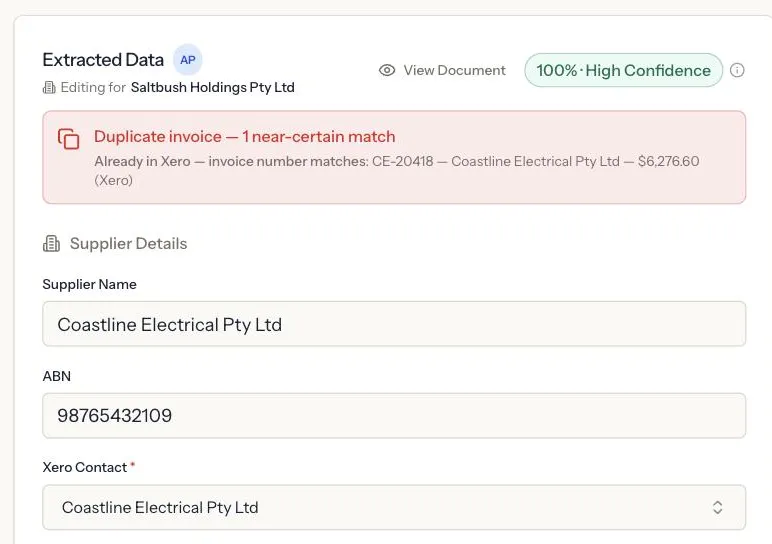
The same supplier and invoice number already in that entity, or already in its Xero, is flagged before it can be paid twice. Unknown sender domains and mismatched ABNs are flagged.
A record of each bill
The processing log keeps each bill’s history, from the email arriving to the draft in Xero. Each customer’s data is isolated from every other customer’s at the database row level.
Procurement
Approve the spend before the invoice turns up.
Requests, purchase orders and supplier onboarding run through the same approvals as your bills. Build request types with your own fields and your own chain of approvers, by role.
Subcontractor engagements
The request carries the margin and warns when it’s below your target, the compliance checklist, and an approval chain where each step is a different person. Once approved, the PO comes out of your own Word template.
Suppliers onboard themselves
Send a link. The supplier fills in ABN, GST status, contacts, bank account, insurance and rates without creating an account. Goods and services suppliers get a shorter form than subcontractors. Finance verifies each one before it becomes an active Xero contact.
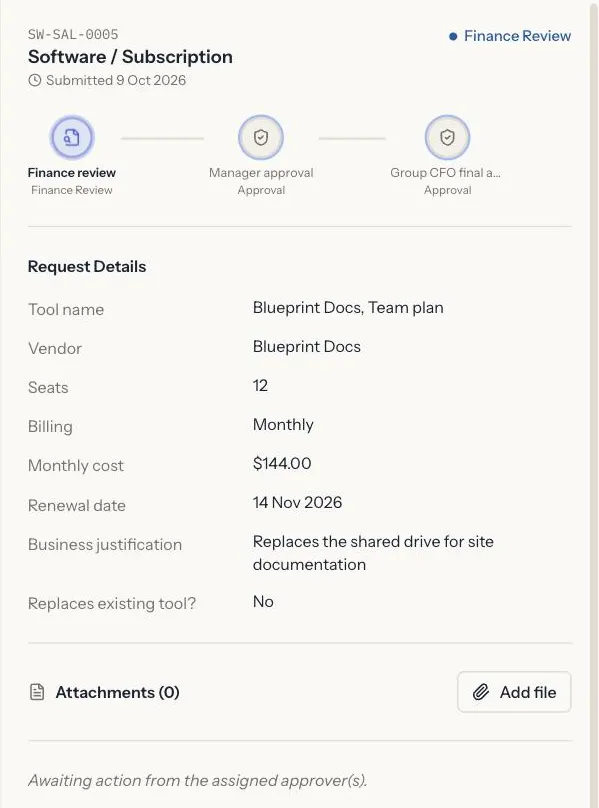
Software and subscription requests
Vendor, cost, owner and business case up front. Approved requests land in the subscription register with an owner and a renewal date.
Subscriptions you didn’t approve
APBuddy scans Xero bills and bank transactions for recurring charges and lists the ones that aren’t in the register yet.
Expense claims
Staff photograph a receipt, APBuddy reads it, and the claim goes to finance for approval and reimbursement.
AP Assistant
Ask your payables a question. Get the bills, not a guess.
“What do we owe Voltaris across the group?” “Which approvals have been waiting more than a week?” The assistant answers from your invoices, approvals, requests and Xero bills, and links each answer to the records behind it.
Totals come from the database. Aging, spend and approval counts are calculated by queries, per currency, not added up by the language model.
It reads; it doesn’t act. The assistant can’t approve, post or change anything.
The real thing
Screens from the app, as they are.
Captured from app.apbuddy.io with every supplier, person and amount swapped for demo values.
Pricing
Priced by the group, not by the ledger.
Every plan includes several entities in its base price, and approvals on every plan. Higher plans add procurement and group features.
Compare plans and trial termsStarter
$149 /month
- Invoices a month
- 250
- Entities included
- 2
- Extra entity
- $19
Capture, approve and post, for a finance team running a couple of entities.
Growth
$349 /month
- Invoices a month
- 1,000
- Entities included
- 6
- Extra entity
- $29
Adds procurement, supplier onboarding and spend control.
Group
$799 /month
- Invoices a month
- 3,000
- Entities included
- 15
- Extra entity
- $39
For multi-entity groups with subcontractors and intercompany costs.
AUD, excluding GST. 14-day trial once you’re set up, no card needed.
Does APBuddy post bills to Xero by itself?
No. Every bill is reviewed and approved by a person before it goes to Xero, and nothing posts until it has every approval its amount requires. What APBuddy posts is a draft bill, with the supplier's PDF attached, so your payment run in Xero stays as it is.
Does it pay suppliers?
No. APBuddy gets bills into Xero coded and approved. Payments still go out the way they do today.
How accurate is the invoice reading?
Each invoice gets a confidence score, and the line items are added up and checked against the total, so a misread figure shows up as a sum that doesn't work. Low scores and failed checks are flagged in the review queue, and someone looks at every bill before it posts.
Do approvers need an APBuddy login?
Not to approve a bill. Approvers get an email and can approve or reject from it. Plans are priced by invoices and entities, not by users.
What does the demo include?
A fully populated demo group in Australia and New Zealand, with bills in review, approvals waiting, purchase requests in flight and the consolidated reporting for the same companies. You don't need a card or a Xero connection, and you can upload up to 20 of your own invoices to see how they read.
Do our entities have to be in Australia?
No. APBuddy is built in Australia and runs entities in New Zealand, the UK and the UAE as well. Bills post in the currency on the invoice, using each entity's own Xero contacts, accounts, tax rates and tracking.
How do we connect Xero?
Through Xero's standard sign-in, one organisation at a time. You don't need your own Xero developer app.
We already use an approval tool. How is this different?
An approval tool handles the sign-off. APBuddy also reads and codes the invoice, posts the bill, and runs procurement and supplier onboarding in the same place. Pricing differs too: ApprovalMax charges per Xero organisation, while each APBuddy plan includes several entities. Our ApprovalMax comparison sets out where each is the better fit, including where ApprovalMax is cheaper. Read the comparison.
Click through a whole group’s payables before you talk to anyone.
The demo opens a populated group of companies with bills in review, approvals waiting and purchase requests in flight. Click through it yourself, or tell us about your entities and we’ll walk you through it on your own Xero.
No card. No Xero connection. Nothing to install.